
Average Calculator – Calculate the Mean of Numbers
Average Calculator
Enter numbers below to get instant results, formula & step-by-step breakdown
An Average Calculator is a simple online tool that helps you calculate the average of a group of numbers quickly. Instead of adding every value manually and then dividing the total by the number of values, you can enter your numbers into the calculator and get the arithmetic mean in seconds.
The average, also known as the arithmetic mean, is one of the most common ways to summarize numerical data. It can be used for test scores, grades, percentages, temperatures, ratings, prices, salaries, measurements, and many other types of data.
If you have only three or four numbers, calculating the average by hand is easy. However, larger datasets can make manual calculations slower and increase the chance of an addition or counting error. An online average calculator makes this process faster while also helping you understand how the result is calculated.
What is an Average Calculator?
An Average Calculator is an online tool that helps you quickly find the average of numbers, also known as the arithmetic mean. Instead of adding a group of values manually and then dividing the total by the number of values, you can enter your data into the calculator and get the result within seconds.
The arithmetic mean is one of the most common measures of central tendency used to summarize a data set with a single representative value. It is useful for calculating average test scores, grades, percentages, ratings, temperatures, prices, salaries, measurements, and other numerical data.
An Average Calculator uses a simple mathematical process. It first finds the sum of all values and then divides that sum by the total number of values in the dataset. This is the standard average formula used to calculate the arithmetic mean.
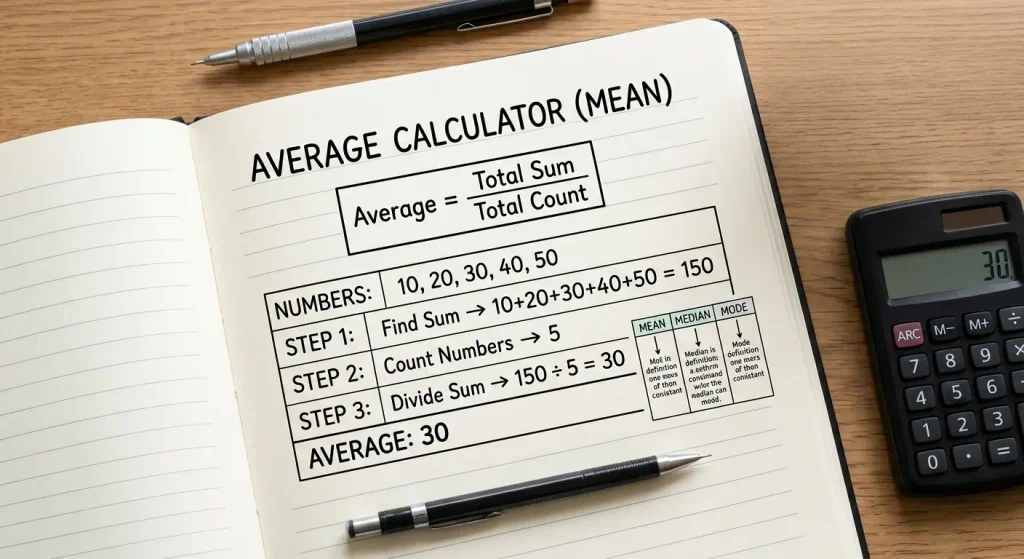
For example, suppose you want to calculate the average of:
10, 20, 30, 40, 50
First, add all five numbers:
10 + 20 + 30 + 40 + 50 = 150
Next, count the number of values. There are 5 numbers.
Now divide the total by the number of values:
150 ÷ 5 = 30
Therefore, the average of the numbers is 30.
You can perform this calculation manually for a small group of values, but an online average calculator becomes more useful when you have a long list of numbers, decimal values, or data that would take more time to calculate by hand.
For example, if you have dozens of exam scores, multiple measurements, daily temperatures, customer ratings, or other numerical observations, entering the values into an Average Calculator can make the calculation faster and reduce basic arithmetic errors.
The result represents the arithmetic mean of the data set, but it does not always describe the data perfectly. Extremely high or low values, known as outliers, can affect the average. In such situations, comparing the mean with other measures such as the median or mode can provide a better understanding of the dataset.
In simple terms, an Average Calculator answers a common mathematical question: What is the average value of these numbers? It applies the standard mean calculation automatically so you can get a quick and understandable result without performing the entire calculation manually.
How Does an Average Calculator Work?
An Average Calculator works by applying the standard arithmetic mean formula to the numbers you enter. The process is simple: it adds all the values together, counts how many values are in the dataset, and then divides the total sum by the number of values.
In mathematical terms, the average is calculated as:
Average = Sum of Values ÷ Number of Values
For example, suppose you want to find the average of these four numbers:
12, 18, 24, 30
First, add all the values:
12 + 18 + 24 + 30 = 84
Next, count the total number of values:
4 numbers
Then divide the sum by the number of values:
84 ÷ 4 = 21
Therefore, the arithmetic mean is 21.
An online average calculator performs these steps automatically, which makes it useful when working with a long list of numbers, decimal values, test scores, ratings, measurements, prices, temperatures, or other numerical data. Instead of calculating the sum and counting every value manually, you can enter the numbers and let the average calculator find the result.
Each value has equal importance in a standard arithmetic average. For example, if one number is unusually high or low, it still contributes to the calculation in the same basic way as the other values. However, extreme values, known as outliers, can have a noticeable effect on the final average.
The same calculation method can also be used with decimal numbers and negative numbers, as long as the values are entered correctly. This makes an Average Calculator useful for many everyday and academic calculations where finding the mean of a dataset is required.
In simple terms, an Average Calculator answers one basic question: What is the arithmetic mean of these numbers? It uses the sum of the values and the total number of observations to provide the average quickly and accurately.
How to Calculate an Average?
You can calculate an average manually by following three simple steps.
Step 1: Add All the Numbers
Start by adding every value in your dataset.
For example:
15 + 25 + 35 + 45 + 55 = 175
The total sum is 175.
Step 2: Count the Values
Now count how many numbers are included.
There are 5 values in the example.
Step 3: Divide the Sum by the Number of Values
Divide the total by the number of values:
175 ÷ 5 = 35
Therefore:
Average = 35
This method works for small and large datasets. An online calculator simply performs these steps automatically.
Average Formula
The basic average formula is:
Average = Sum of All Values ÷ Number of Values
In statistics, the arithmetic mean is often represented using:
x̄ = Σx ÷ n
Where:
- x̄ = arithmetic mean
- Σx = sum of all values
- n = total number of values
For example, consider the following numbers:
8, 12, 16, 20
Add them together:
8 + 12 + 16 + 20 = 56
There are four values:
56 ÷ 4 = 14
The average is 14.
Understanding this formula is useful even when you use an online calculator because it allows you to verify whether your result makes sense.
Average Calculator Example
Let’s look at a practical Average Calculator example using student test scores. Finding the average of exam results is one of the common ways to understand the overall performance of a student.
Suppose a student receives these five test scores:
65, 72, 81, 76, 91
Step 1: Add the Scores
First, add all five scores to find the total:
65 + 72 + 81 + 76 + 91 = 385
The sum of the values is 385.
Step 2: Count the Values
There are 5 test scores in the dataset.
Step 3: Divide the Total by the Number of Scores
Now divide the total score by the number of tests:
385 ÷ 5 = 77
So, the student’s average test score is 77.
This means that although the individual scores range from 65 to 91, their arithmetic mean is 77. The average provides a single number that summarizes the student’s overall test performance.
If you were using an online Average Calculator, you could simply enter:
65, 72, 81, 76, 91
The calculator would add the numbers, count the five values, and return 77 as the average.
The same method can be used to calculate the average of exam scores, assignment grades, quiz results, subject marks, ratings, prices, temperatures, or other numerical data. For larger datasets, an online calculator can also reduce the chance of basic addition or division errors.
How to Find the Average of Numbers?
Finding the average of numbers is straightforward when each value has equal importance. The standard method is to add all the numbers together and divide the total by the number of values in the dataset. This calculation gives you the arithmetic mean, which is the most common type of average.
Suppose your numbers are:
22, 28, 31, 39, 45
Step 1: Add All the Numbers
First, calculate the total sum of the values:
22 + 28 + 31 + 39 + 45 = 165
Step 2: Count the Values
There are 5 numbers in the dataset.
Step 3: Divide the Sum by the Number of Values
Now divide the total by 5:
165 ÷ 5 = 33
Therefore, the average is 33.
The same process can be represented by the average formula:
Average = Sum of Values ÷ Number of Values
For a small dataset, calculating the average manually is usually quick. However, when you have dozens or hundreds of numbers, adding every value and counting the entries manually can take more time and increase the chance of a calculation error.
An Average Calculator can handle this process automatically. You can enter the complete dataset, and the calculator calculates the sum, determines the number of values, and provides the arithmetic mean.
This method can be used for many types of numerical data, including test scores, grades, percentages, prices, ratings, measurements, daily temperatures, and other datasets. As long as you are looking for a standard arithmetic average and each value should have equal weight, the basic formula remains the same.
Average of Decimals
An average does not always have to be a whole number. When the values in a dataset contain decimals, the arithmetic mean can also be a decimal value. An Average Calculator can handle decimal numbers in the same way it handles whole numbers: add all values and divide the total by the number of values.
For example, consider these decimal numbers:
2.5, 4.5, 6.5, 8.5
Step 1: Add the Values
2.5 + 4.5 + 6.5 + 8.5 = 22
Step 2: Count the Values
There are 4 values.
Step 3: Calculate the Average
22 ÷ 4 = 5.5
Therefore, the average is 5.5.
The result can also contain several decimal places. For example:
4.2, 5.7, 6.8
First, find the sum:
4.2 + 5.7 + 6.8 = 16.7
There are three values, so:
16.7 ÷ 3 = 5.566666…
The exact arithmetic mean is approximately 5.5667, or 5.57 when rounded to two decimal places.
This shows why decimal averages may need to be rounded when the result contains many decimal places. The appropriate number of decimal places depends on how precise the original data needs to be. For example, a school grade may be reported to two decimal places, while a scientific measurement may require greater precision.
An online Average Calculator can calculate decimal averages quickly and display the result without requiring manual division. This is useful for datasets containing decimal measurements, prices, temperatures, ratings, percentages, test scores, and other numerical values.
When entering decimal numbers into a calculator, make sure each value is entered correctly and that no number is accidentally omitted. The calculator then applies the standard arithmetic mean formula to the complete dataset.
Average With Negative Numbers
You can calculate the average of positive and negative numbers using the same average formula. Add all the numbers together, then divide the total by how many numbers you have.
Example: Find the average of -10, -5, 5, and 10.
Step 1: Add all the numbers.
-10 + (-5) + 5 + 10 = 0
Step 2: Count the numbers.
There are 4 numbers in total.
Step 3: Divide the sum by the number of values.
Average = 0 ÷ 4 = 0
Final Answer: The average of -10, -5, 5, and 10 is 0.
Tip: When using an average calculator, enter negative numbers with the minus sign (−). Always check the positive and negative signs to get the correct result.
Can an Average Be Zero?
Yes, an average can be zero even when none of the numbers is zero. This happens when the positive and negative numbers cancel each other out.
Example: Find the average of -20, -10, 10, and 20.
Step 1: Add all the numbers.
-20 + (-10) + 10 + 20 = 0
Step 2: Count the values.
There are 4 numbers.
Step 3: Divide the total by the number of values.
Average = 0 ÷ 4 = 0
Final Answer: The average is 0.
Remember: When the sum of all values is zero, their average is also zero. You can use an average calculator to check your answer quickly.
How to Calculate Average Percentage?
You can calculate the average percentage by adding all the percentages and dividing the total by the number of values. This method works when all values are equally important.
Example: Find the average of 60%, 70%, 80%, and 90%.
Step 1: Add all the percentages.
60 + 70 + 80 + 90 = 300
Step 2: Count the percentages.
There are 4 percentages.
Step 3: Divide the total by 4.
300 ÷ 4 = 75
Final Answer: The average percentage is 75%.
When Should You Use a Weighted Average?
A simple average does not always give the correct result. If percentages are based on different totals or have different weights, you may need a weighted average.
For example, if your final grade includes a test worth 50% of your grade and an assignment worth 10%, their scores may have different effects on your final result. In this case, use the correct weights to calculate the overall percentage.
Tip: Use an average calculator for a quick result when all percentages have equal importance. For different weights, check how much each score contributes to the final total.
Average Score Calculator
An average score calculator helps students find their average marks from tests, quizzes, or assignments. It adds all the scores and divides the total by the number of scores.
Example: Calculate the average of these scores:
70, 82, 75, 88, 91
Step 1: Add all the scores.
70 + 82 + 75 + 88 + 91 = 406
Step 2: Count the scores.
There are 5 scores.
Step 3: Divide the total by the number of scores.
Average Score = 406 ÷ 5 = 81.2
Final Answer: The average score is 81.2 marks.
Students can use an average score calculator to check their performance across different tests and assignments. It gives a quick overview of their results. However, if tests or assignments have different weights, a weighted average may be needed to calculate the overall grade correctly.
Average Grade Calculator
An average grade calculator helps you find your average grade from different tests, quizzes, or assignments. You can use a simple average when all grades have equal importance.
Example: Calculate the average of these grades:
80, 85, 90, 75
Step 1: Add all the grades.
80 + 85 + 90 + 75 = 330
Step 2: Count the grades.
There are 4 grades.
Step 3: Divide the total by the number of grades.
Average Grade = 330 ÷ 4 = 82.5
Final Answer: Your average grade is 82.5.
An average grade calculator makes it easy to check your academic performance. However, if some tests or assignments count more toward your final grade than others, you may need a weighted average for an accurate result.
Mean vs Average
In basic math, mean and average usually mean the same thing. Both terms are often used to describe the result of adding all numbers and dividing the total by how many numbers there are.
Example: Find the mean or average of 5, 10, and 15.
Step 1: Add the numbers.
5 + 10 + 15 = 30
Step 2: Count the numbers.
There are 3 numbers.
Step 3: Divide the total by the number of values.
Average = 30 ÷ 3 = 10
Final Answer: The arithmetic mean, or average, is 10.
What is the Difference Between Mean and Average?
The word average can refer to different ways of finding a typical value, such as the mean, median, or mode. The arithmetic mean is one type of average. When you use an average calculator to find the average of a list of numbers, it usually calculates the arithmetic mean.
Mean vs Median vs Mode
Mean, median, and mode are three ways to find the center or most common value in a group of numbers. Each method works differently and helps you understand your data.
1. Mean
The mean is the arithmetic average of a group of numbers. To calculate it, add all the numbers and divide the total by how many numbers you have.
Example: 10, 20, 30
- Sum: 10 + 20 + 30 = 60
- Number of values: 3
- Mean: 60 ÷ 3 = 20
2. Median
The median is the middle number when values are arranged from smallest to largest.
Example: 10, 20, 30, 40, 50
The middle number is 30, so the median is 30.
If there are an even number of values, find the average of the two middle numbers to get the median.
3. Mode
The mode is the number that appears most often in a dataset.
Example: 2, 4, 4, 5, 7
The number 4 appears twice, more than any other number. So, the mode is 4.
Difference Between Mean, Median, and Mode
| Measure | Meaning | Example Result |
|---|---|---|
| Mean | Add values and divide by their count | 20 |
| Median | Find the middle value | 30 |
| Mode | Find the most frequent value | 4 |
Mean, median, and mode can give different results because each measures data in a different way. Use the mean to find the average, the median to find the middle value, and the mode to find the most common value.
Average vs Median: Which is Better?
The mean and median are both useful, but the best choice depends on your data. The mean gives you the average of all values, while the median shows the middle value when the numbers are arranged from smallest to largest.
When Should You Use the Mean?
The mean is useful when you want to calculate the average of all values. It uses every number in the calculation, but very high or very low values can change the result.
When Should You Use the Median?
The median is useful when your data contains unusually high or low values. It is less affected by these extreme values and can give you a better idea of what is typical.
Example: Compare the Mean and Median
Suppose your numbers are:
20, 25, 30, 35, 500
Step 1: Calculate the mean.
20 + 25 + 30 + 35 + 500 = 610
Mean = 610 ÷ 5 = 122
Step 2: Find the median.
The numbers are already arranged from smallest to largest. The middle number is 30.
- Mean: 122
- Median: 30
In this example, the value 500 is much higher than the other numbers. It increases the mean to 122, while the median stays at 30.
Final Verdict: Use the mean when you want the average of all values. Use the median when extreme values may affect the result. For this example, the median better represents the typical value in the dataset.
How Outliers Affect the Average
An outlier is a number that is much higher or lower than most other values in a dataset. Outliers can change the average because the arithmetic mean uses every number in the calculation.
Example: Find the average of these numbers.
10, 11, 12, 13, 100
Step 1: Add all the numbers.
10 + 11 + 12 + 13 + 100 = 146
Step 2: Count the numbers.
There are 5 numbers.
Step 3: Divide the total by the number of values.
Average = 146 ÷ 5 = 29.2
Final Answer: The average is 29.2.
Notice that four numbers are between 10 and 13, but the outlier 100 increases the average to 29.2.
Why does this matter?
When a dataset contains extreme values, the average may not show what is typical. You can also calculate the median to better understand the data. In this example, the median is 12, which is closer to most of the numbers.
Weighted Average
A weighted average calculator helps you find an average when some values are more important than others. Unlike a simple average, a weighted average gives each value a different level of importance, called a weight.
Weighted Average Formula
Weighted Average = Sum of (Value × Weight) ÷ Sum of Weights
Example: Calculate a Weighted Grade
Suppose your final grade is based on homework, quizzes, and a final exam:
| Assessment | Score | Weight |
|---|---|---|
| Homework | 80 | 20% |
| Quizzes | 90 | 30% |
| Final exam | 70 | 50% |
Step 1: Multiply each score by its weight.
- Homework: 80 × 0.20 = 16
- Quizzes: 90 × 0.30 = 27
- Final exam: 70 × 0.50 = 35
Step 2: Add the results.
16 + 27 + 35 = 78
Final Answer: Your weighted average grade is 78%.
The final exam has the greatest effect on your grade because it carries the highest weight.
When should you use a weighted average?
Use a weighted average when tests, assignments, exams, or other values have different levels of importance. If every value has equal importance, a simple arithmetic average is usually enough.
Can You Average Averages?
Yes, you can average averages, but the correct method depends on the size of each group. If the groups have different numbers of values, a simple average of their averages may give the wrong result.
Example: Two Classes
- Class A has 10 students.
- Class B has 100 students.
If you calculate the average score for each class, you must also consider how many students are in each class before finding the overall average.
How to Calculate the Overall Average?
When groups have different sizes, use this formula:
Overall Average = Total of All Values ÷ Total Number of Values
You can also multiply each group’s average by its number of values, add the results, and divide by the total number of values.
For example, if Class A has an average score of 80 and Class B has an average score of 90:
- Class A: 80 × 10 = 800
- Class B: 90 × 100 = 9,000
- Total: 800 + 9,000 = 9,800
- Total students: 10 + 100 = 110
Overall Average = 9,800 ÷ 110 = 89.09
The overall average is 89.09, not 85.
Remember: You can directly average group averages when all groups have the same number of values. When group sizes differ, use a weighted average to get the correct result.
Arithmetic Mean vs Geometric Mean
The arithmetic mean and geometric mean are two ways to calculate an average. The right method depends on the type of numbers you are working with.
1. Arithmetic Mean
The arithmetic mean is the common average used in everyday calculations. To find it, add all the numbers and divide the total by the number of values.
Example: 10, 20, 30
- Sum: 10 + 20 + 30 = 60
- Number of values: 3
- Arithmetic Mean: 60 ÷ 3 = 20
You can use the arithmetic mean to calculate average test scores, grades, temperatures, and ratings with an average calculator.
2. Geometric Mean
The geometric mean is useful when working with growth rates, ratios, and values that change by multiplication. To calculate it, multiply all the positive values and find the appropriate root of the result.
Example: 2 and 8
- Multiply: 2 × 8 = 16
- Find the square root: √16 = 4
The geometric mean is 4.
Difference Between Arithmetic Mean and Geometric Mean
| Feature | Arithmetic Mean | Geometric Mean |
|---|---|---|
| Method | Add and divide | Multiply and find the root |
| Best for | Test scores and grades | Growth rates and ratios |
| Example | 10, 20, 30 → 20 | 2, 8 → 4 |
Which one should you use?
For everyday calculations, such as average marks, grades, and ratings, the arithmetic mean is usually the right choice. For compound growth rates and proportional changes, the geometric mean may be more suitable.
Average Calculator for Large Data Sets
An average calculator makes it easier to find the average of a large set of numbers. Instead of adding every value and counting the numbers by hand, you can enter or paste your data into an online calculator to find the average quickly.
For example, if you have 100 measurements from an experiment, calculating the average manually can take time. An online average calculator can do the math for you and help reduce counting and calculation mistakes.
What Data Can You Calculate?
You can use an average calculator for many types of data, including:
- Survey results: Find the average of survey scores or responses.
- Exam results: Calculate average marks for students.
- Temperature readings: Find the average temperature over a period.
- Product prices: Calculate the average price of different products.
- Sales figures: Find average sales over several days or months.
- Customer ratings: Calculate the average rating of a product or service.
- Scientific measurements: Find the mean of repeated measurements.
- Financial data: Calculate the average of suitable numerical values.
Why Use an Online Average Calculator?
An online average calculator saves time when working with many numbers. It can calculate the arithmetic mean automatically, making it easier to check results without doing every step by hand.
For very large datasets, check that all values are entered correctly. If your data contains missing values, different weights, or unusual numbers, consider how these may affect the final average.
Common Uses of an Average Calculator
An average calculator helps you find the average of a group of numbers quickly. You can use it for schoolwork, business, research, and everyday calculations.
1. Test Scores
Students can use an average calculator to find their average marks across multiple tests. It helps them check their performance without calculating each result by hand.
2. Grades
Teachers and students can calculate average grades from assignments, quizzes, and exams. If each grade has a different weight, a weighted average may be needed.
3. Percentages
You can calculate the average of several percentages when they have equal importance. For percentages based on different totals, a weighted average may give a more accurate result.
4. Ratings
Businesses can calculate the average rating of a product or service from numerical customer reviews. This helps summarize customer feedback in one number.
5. Temperatures
An average calculator can find the average of temperature readings collected over several hours or days. This helps summarize temperature data for a selected period.
6. Prices
You can find the average price of different products or transactions with an average calculator. This makes it easier to compare prices and understand the typical cost within a group.
7. Salaries
An average calculator can show the mean salary for a group of workers. However, when salaries vary greatly, the median salary may better represent a typical worker’s income.
8. Measurements
Students and researchers can calculate the average of repeated measurements, such as length, weight, or experimental results. The mean helps summarize the data in a single value.
Tip: An average calculator is useful whenever you need to find the arithmetic mean of numerical data. Always check whether a simple average or a weighted average is right for your calculation.
Why Calculate an Average?
An average helps you understand a group of numbers with one simple value. It makes large sets of data easier to read, compare, and understand.
For example, students can compare the average test scores of two classes. You can also use average temperatures to understand weather changes over several days.
An average is useful, but it does not tell the whole story. Two groups can have the same average even when their numbers are very different. For better results, also consider the number of values and how they are spread out.
When Should You Use an Average Calculator?
An Average Calculator helps you find the arithmetic mean of a group of numbers quickly. It adds all the values and divides the total by the number of values.
You can use an average calculator when:
- You have many numbers: Calculate the average of a long list of values in less time.
- You are working with decimals: Find the average of numbers such as 12.5, 15.75, and 18.25.
- You need several averages: Calculate averages for different groups without repeating every step manually.
- You want to check your answer: Compare the calculator result with your manual calculation.
- You are calculating grades or test scores: Find the average score from multiple tests or assignments.
- You are analyzing data: Summarize numbers such as temperatures, prices, ratings, or measurements.
- You need quick results: Get an answer without doing the calculation by hand.
- You want to reduce calculation errors: Avoid mistakes when adding and dividing several values.
For three or four numbers, manual calculation is usually easy. However, an average calculator is more helpful when you have a long list of numbers or need results quickly.
Tip: A standard average calculator works best when all values have equal importance. If some values count more than others, use a weighted average calculator instead.
Common Mistakes When Calculating an Average
Calculating an average is simple, but small mistakes can lead to the wrong answer. An Average Calculator can help you check your results, but you still need to enter the correct numbers.
1. Forgetting a Value
Leaving out one number can change the final average. Before calculating, check your list to make sure every value is included.
Example: If your numbers are 10, 20, and 30, the correct sum is 60. Forgetting 30 gives an incorrect result.
2. Counting the Values Incorrectly
After adding all the numbers, divide the sum by the total number of values. Do not divide by the wrong count.
Example: The average of 10, 20, and 30 is 60 ÷ 3 = 20, not 60 ÷ 2.
3. Mishandling Negative Numbers
Negative numbers must keep their minus signs during addition. Changing a negative value to a positive one can produce an incorrect average.
Example: The average of -5, 5, and 10 is 10 ÷ 3 = 3.33 (approximately).
4. Averaging Values with Different Weights
A simple average treats every value as equally important. If some scores or values carry more weight, use a weighted average instead.
Example: A final exam worth 60% should have more influence on the overall grade than homework worth 40%.
5. Rounding Too Early
Rounding numbers before completing the calculation can affect the final result. Keep the original values during the calculation and round only the final answer when needed.
Tip: To get an accurate result, enter every number correctly, count the values carefully, and choose the right type of average for your data.
Does the Average Have to Be One of the Numbers?
No. The average does not have to be one of the original numbers. It can be a decimal value that falls between two numbers in your dataset.
For example, suppose your numbers are 10, 20, and 31.
Step 1: Add all the numbers.
10 + 20 + 31 = 61
Step 2: Count the numbers.
There are 3 values.
Step 3: Divide the sum by the number of values.
61 ÷ 3 = 20.33 (approximately)
Final Answer: The average is 20.33.
Although 20.33 is not in the original list, it is the correct arithmetic mean. You can use an Average Calculator to find the mean of whole numbers, decimals, and other numerical values quickly.
Can an Average Be Higher Than the Largest Number?
No. The arithmetic mean cannot be higher than the largest number or lower than the smallest number in a dataset. It always falls between these two values.
For example, suppose your numbers are 10, 20, and 30.
Step 1: Add the numbers.
10 + 20 + 30 = 60
Step 2: Count the values.
There are 3 numbers.
Step 3: Calculate the average.
60 ÷ 3 = 20
Final Answer: The average is 20, which is between the smallest value (10) and the largest value (30).
If your calculated average is higher than the largest number or lower than the smallest number, check your addition, the number of values, and your division. You may have made a calculation error.
What is Central Tendency?
Central tendency is a way to find the center or typical value of a group of numbers. It helps you understand a dataset without looking at every number separately. There are three common measures of central tendency:
- Mean: The average found by adding all values and dividing the sum by the number of values.
- Median: The middle value when the numbers are arranged from smallest to largest.
- Mode: The value that appears most often in a dataset.
For example, an Average Calculator can help you find the mean of test scores, daily temperatures, or product ratings.
The mean uses every value in the dataset, but very high or low numbers can affect the result. The median can be more useful when the data contains extreme values, while the mode helps identify the most common value.
Tip: Choose the mean, median, or mode based on the type of data you have and what you want to learn from it.
Conclusion
An Average Calculator provides a quick and convenient way to calculate the arithmetic mean of a group of numbers. The underlying calculation is simple: add all values, count the number of values, and divide the total sum by that count.
The tool becomes particularly useful when working with large datasets, decimal numbers, test scores, grades, percentages, ratings, temperatures, prices, measurements, or other numerical information.
Understanding the difference between the mean, median, mode, weighted average, and geometric mean can also help you choose the right method for your data. The arithmetic mean works well for many situations, but extreme values and unequal weights can affect whether it accurately represents the information.
For quick calculations, manual arithmetic may be enough. When you need to process many numbers or verify your result, an online Average Calculator can make the calculation faster, simpler, and easier to check.
Frequently Asked Questions
What is an Average Calculator?
An Average Calculator is an online tool that calculates the arithmetic mean of a group of numbers by dividing the sum of the values by the number of values.
How do you calculate an average?
Add all the values together and divide the sum by the total number of values.
What is the average formula?
The basic formula is:
Average = Sum of Values ÷ Number of Values
Is an Average Calculator accurate?
An Average Calculator can give an accurate result when you enter the correct numbers and use the right calculation method. Always check your values, especially when working with large datasets.
What is an arithmetic mean?
The arithmetic mean is the standard mathematical average calculated by adding all values and dividing the sum by their count.
Can an average be a decimal?
Yes. The result can be a whole number or a decimal depending on the values in the dataset.
Can you calculate the average of negative numbers?
Yes. Negative numbers can be included in an arithmetic mean as long as their signs are entered correctly.
How do you calculate the average of percentages?
Add the percentages and divide by their number when all percentages have equal importance. If they have different weights, use a weighted average.
When should I use a Weighted Average Calculator?
Use a Weighted Average Calculator when some values matter more than others. For example, if your final exam counts more toward your grade than your homework, a weighted average gives a more suitable result.
More calculators
Financial Calculators
Financial Calculators
TSP Growth Calculator
Use a TSP Growth Calculator to estimate retirement savings, contributions, government matching, investment growth, withdrawals, and future income.
Financial Calculators
VOO Calculator
Use the VOO Calculator to estimate investment growth, dividend income, and future returns. Discover your potential gains and make smarter investment plans.
Financial Calculators
Salary Calculator
Use our free online salary calculator fast easy to convert hourly, daily, weekly, monthly, and annual pay. Compare earnings and estimate your salary instantly.
Math Calculators
Math Calculators
Decimal Calculator
Decimal Calculator for fast and accurate decimal addition, subtraction, multiplication, division, percentages, rounding, and conversions online.
Percentage Calculators
Percentage Calculators
Quick Easy Grade Calculator
Use our Quick Easy Grade Calculator to calculate grades, check percentages, and find your scores instantly. Get fast, accurate results for school and college.
Latest articles
Math Calculators
Decimal Calculator
Decimal Calculator for fast and accurate decimal addition, subtraction, multiplication, division, percentages, rounding, and conversions online.
Financial Calculators
TSP Growth Calculator
Use a TSP Growth Calculator to estimate retirement savings, contributions, government matching, investment growth, withdrawals, and future income.
Online Calculators
Split Calculator
Use a free Split Calculator to divide bills, rent, restaurant costs, and shared expenses equally or by custom amounts. Calculate each person's share easily.